



Matomo stores its cookies on your website’s domain, not on someone else’s. The data goes to your own Matomo instance and nowhere else. The cookies still belong in your privacy policy, and whether they need consent depends on how Matomo is configured.
The default cookies
Matomo’s tracking code sets these cookies as soon as it is allowed to set cookies:
| Cookie | Purpose | Lifetime |
|---|---|---|
_pk_id |
Random visitor ID: recognises returning visitors and builds the visitor profile | 13 months |
_pk_ses |
Links the page views, downloads and events of one visit | 30 minutes |
_pk_ref |
Remembers which source the visitor came from, to attribute goals to channels and campaigns | 6 months |
_pk_testcookie |
Only in Internet Explorer: checks whether cookies are allowed | deleted right away |
In the browser the cookies have slightly longer names, such as _pk_id.2.1a2b: Matomo appends the site ID and a short hash of the domain. The 13 months of the visitor cookie are exactly 393 days, one year and four weeks.
Cookies for additional features
Further cookies only appear when you use certain features:
| Cookie | When | Lifetime |
|---|---|---|
mtm_cookie_consent |
Matomo stores the consent to cookies itself (rememberCookieConsentGiven) |
up to 30 years, configurable |
mtm_consent |
Matomo stores the consent to tracking itself (rememberConsentGiven) |
up to 30 years, configurable |
mtm_consent_removed |
A visitor objects through Matomo’s opt-out | up to 30 years |
matomo_sessid |
Security value against attacks on the opt-out | 14 days |
_pk_hsr |
Heatmaps and session recordings | 30 minutes |
_pk_cvar |
Custom variables with the Custom Variables plugin | 30 minutes |
_pk_uid |
Same visitor ID across several domains, only if switched on in the configuration | 13 months |
MatomoAbTesting |
A/B tests, stored in local storage instead of a cookie | until the visitor deletes it |
The 30 years are a maximum. According to Matomo, some browsers delete such cookies if someone has not visited the website for a while: Safari after 7 days, Firefox after 45 and Chrome after 400 days (as of October 2024). An opt-out can get lost that way.
Changing the lifetimes
All lifetimes can be changed in the tracking code, in seconds, the consent in hours:
_paq.push(['setVisitorCookieTimeout', 15768000]); // visitor ID: 6 months instead of 13
_paq.push(['setReferralCookieTimeout', 2592000]); // origin: 30 days instead of 6 months
_paq.push(['setSessionCookieTimeout', 1800]); // visit: 30 minutes as before
_paq.push(['rememberCookieConsentGiven', 8760]); // consent: 1 year instead of up to 30 years
Shorter lifetimes have a consequence: if someone returns after the visitor ID has expired, Matomo counts them as a new visitor, and a conversion can only be attributed to the source that is still in the cookie.
Setting it up in Matomo Tag Manager
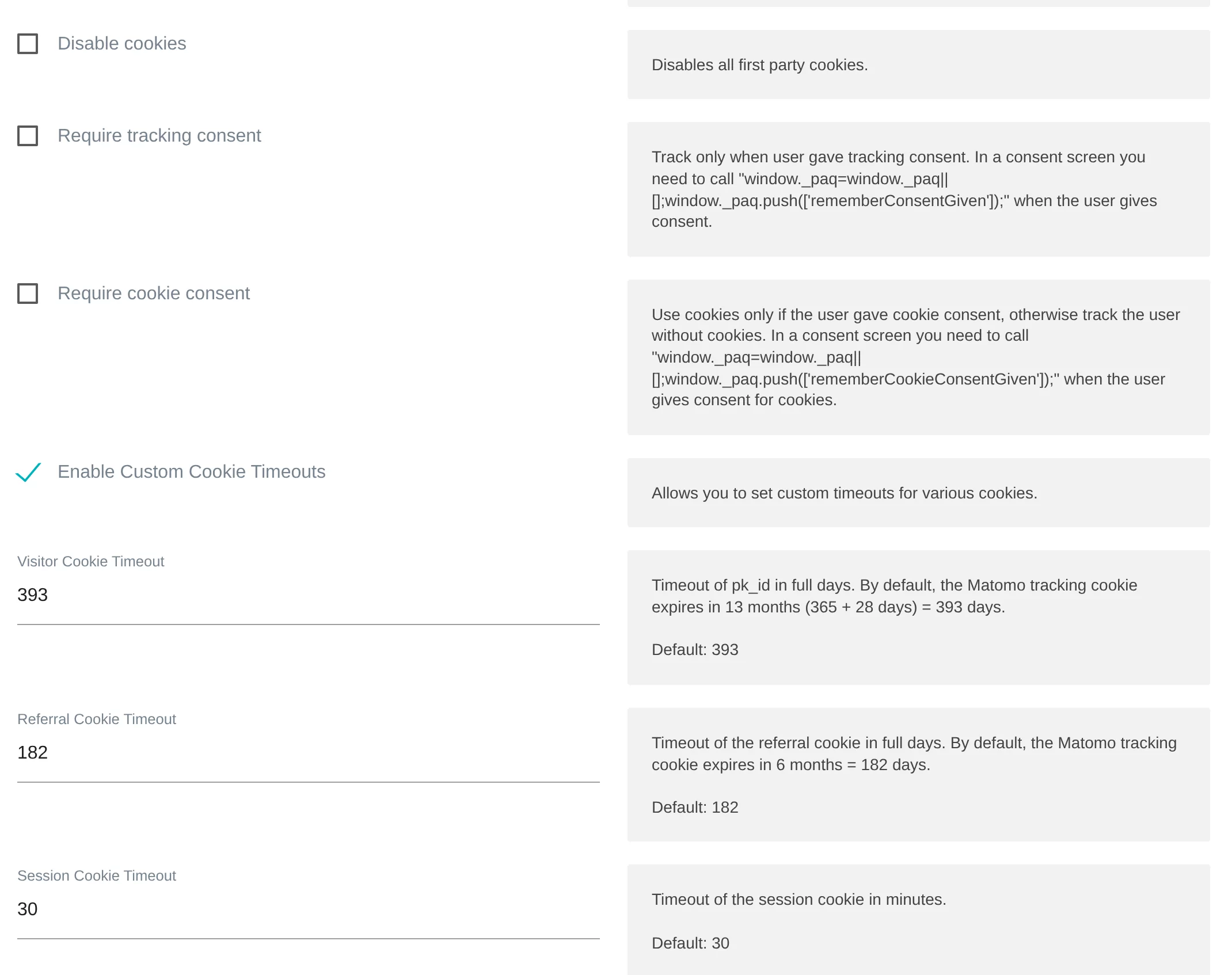
If you use Matomo Tag Manager, you can do all of this without code: in the Matomo Configuration variable of your container, under Variables. There you find:
- Disable cookies corresponds to
disableCookies. - Require tracking consent corresponds to
requireConsent: without consent, Matomo does not measure at all. - Require cookie consent corresponds to
requireCookieConsent: without consent, Matomo measures without cookies. - Enable Custom Cookie Timeouts shows the three lifetimes: visitor and referral cookie in days, the session cookie in minutes.
- Further fields cover Cookie Domain, Cookie Path, Cookie Name Prefix, Same Site Cookie and Enable Secure Cookie, plus Disable Browser Feature Detection.
Changes only take effect once you publish a new version of the container. Test them in preview mode first, and afterwards check in your browser which cookies are actually set.
Measuring without cookies
Matomo can measure without any analytics cookies. Two settings are common for this:
disableCookies: Matomo measures without analytics cookies. This suits websites that do not ask for consent for web analytics.requireCookieConsent: Matomo measures right away, but without cookies. Only once the visitor consents are_pk_id,_pk_sesand_pk_refadded.
In both cases Matomo can still set the cookie for the objection, so that an opt-out works.
There is also a global option in Matomo under Administration > Privacy > Anonymize data: Force tracking without cookies. According to Matomo, it switches cookies off even when the tracking code reports consent. Without cookies, Matomo recognises returning visitors less often, and attributing goals to campaigns is mostly limited to the current visit. Which settings belong to this and what it means for your reports is described under cookieless & privacy settings.
The details for your privacy policy
Choose how your Matomo is configured and which features you use. You can copy the result as a table for Word or your CMS, or paste it as HTML. Your selection never leaves your browser.
Preview
Default lifetimes according to Matomo. If you changed lifetimes, adjust the values. Not legal advice: whether and how you use these details is for your data protection adviser to decide.
Sources
As of 10 November 2026