



Page views show which pages are read. What visitors do there, they do not show: is the form submitted, the video started, the calculator used? That is what events are for. Every event belongs to a visit and appears in Matomo under Behaviour > Events.
Anatomy of an event
| Field | Required | Question | Example |
|---|---|---|---|
| Category | yes | What is it about? | Form |
| Action | yes | What happened? | sent |
| Name | no | Which one exactly? | contact |
| Value | no | How much? | a number, for example 4 for four stars |
Matomo turns each field into a report of its own: Event Categories, Event Actions and Event Names. In each report you expand a row and see the second level, for example the actions of a category. Matomo sums up the value and also shows average, minimum and maximum.
Sending events
There are three ways, and all of them end up in the same reports.
1. In the website’s JavaScript. Where the Matomo tracker runs, one line is enough:
_paq.push(['trackEvent', 'Form', 'sent', 'contact']);
_paq.push(['trackEvent', 'Rating', 'given', 'Guide cookies', 4]);
If the category or the action is missing, the tracker drops the event and reports an error in the browser console.
2. In Matomo Tag Manager. A Matomo Analytics tag with the tracking type Event, fired by a suitable trigger. Most robust is an event that the website writes into the data layer. I show how that works, with examples, under Matomo Tag Manager.
3. From the server. Through Matomo’s tracking API with the parameters e_c (category), e_a (action), e_n (name) and e_v (value). That suits things the browser does not notice, for example a payment that only the payment provider confirms. When that pays off is described in the article Server-side tracking with Matomo.
A naming convention
Events are quick to add, and that is exactly the problem: every agency and every team invents its own names, and after a year “Form”, “form” and “Contact form submitted” sit side by side. Matomo is case sensitive here, unlike for campaigns: every variant is a row of its own.
A simple rule that works:
- Category is the object: form, video, filter, calculator, download.
- Action is what happened, in the past tense: sent, started, applied, copied.
- Name is the detail: which form, which video, which filter.
- Value only if a number really means something, for example the stars of a rating or a calculated amount.
| Instead of | Better |
|---|---|
Click / button bottom blue |
Enquiry / opened / header |
form / submit and Form / sent |
one spelling: Form / sent / contact |
Search / hiking boots men size 10 |
Matomo’s site search, not events |
Order / B-10234 |
a goal or ecommerce, no order number as the action |
Variable values such as IDs, timestamps or search terms do not belong in category and action, and only sparingly in the name. Keep the allowed categories and actions in a list everyone knows. That is the core of a tracking concept.
The reports
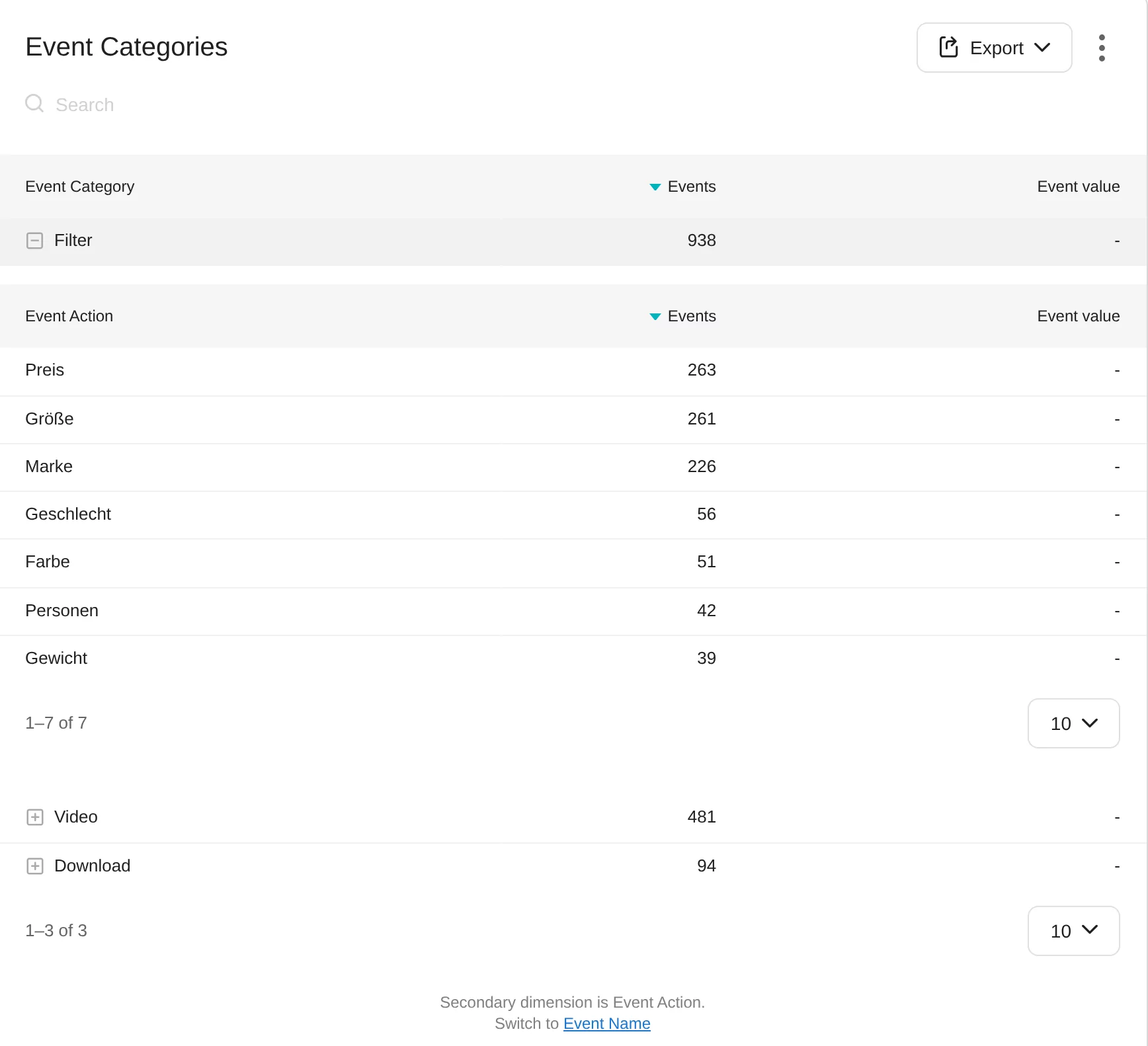
In the example, the type of filter is in the action. That is a convention that works too, as long as the website does it the same way everywhere. Below each report you switch the second level between action and name.
Besides the number of events, Matomo shows the Event value as a sum, plus Average value, Minimum Event value and Maximum Event value, and how many events had a value at all. For ratings, the average is the right column; for amounts, the sum.
For segments, eventCategory, eventAction, eventName and eventValue are available. With eventAction==sent, for example, you see all visits in which something was sent, and which channels they came from.
Turning an event into a goal
Events count, goals rate. For a submitted form to appear in the conversion rate and in the analysis by channel, add a new goal under Goals and choose Send an event. Then you define what Matomo checks: category, action or name, with “contains”, “is exactly” or a regular expression, optionally as a case sensitive match.
Two options are useful here:
- “Use the event value (if it exists) as the goal conversion revenue”. An event with a value then enters its amount as revenue into the goal.
- “Allow Goal to be converted more than once per visit”. Useful for downloads or orders, not for an enquiry.
A new goal only counts from the moment you create it. Matomo does not apply it to earlier visits by itself. So create goals together with the event.
Side effects worth knowing
- The bounce rate drops. Matomo counts a visit as a bounce when it has at most one action. Events are actions. An event for scroll depth or reading time turns almost every bounce into a visit with two actions. There is no option to exclude an event from this.
- Visits get longer. Matomo measures the duration up to the last action. A late event lengthens the visit.
- Actions per visit go up, because events count as well.
- The reports have a limit. By default, Matomo stores 500 rows per events report and period, and 500 in each second level as well. The rest is listed under “Others”. The limits can be raised in the configuration, but that costs storage and processing time during archiving.
- Measured twice. Matomo already records downloads and outlinks by itself when link tracking is active. An additional event for the same click counts it twice, just in other reports.
Personal data belongs in no field: no names, no email addresses, no free text from forms. Whatever you send as a name is readable for anyone in the reports.
Sources
As of 11 November 2026
- Matomo: Event tracking (guide)
- Matomo: How do I implement event tracking?
- Matomo for developers: JavaScript tracking guide
- Matomo for developers: tracking API with the parameters e_c, e_a, e_n and e_v
- Matomo: Goals and conversions
- Matomo on GitHub: default configuration with the row limits of the events reports