



Matomo On-Premise has a big advantage: the data sits on your server, no vendor analyses it for its own purposes, and nothing goes to a third country. Still, Matomo processes personal data such as IP addresses and visitor identifiers. And measuring as such can touch the visitor’s device. That is why every Matomo installation comes with two questions and a handful of settings.
Two questions: TDDDG and GDPR
First: does Matomo access the device? In Germany this is governed by § 25 TDDDG (the Telecommunications Digital Services Data Protection Act, formerly TTDSG), which implements Article 5(3) of the EU ePrivacy Directive. The provision does not only apply to cookies. In principle, any storing of information on the device and any access to information already stored there needs consent, unless it is strictly necessary for the service the user requested. Web analytics is generally not considered strictly necessary.
Second: on what basis do you process the data? Once § 25 TDDDG is satisfied, the subsequent processing of personal data needs a legal basis under the GDPR: either consent or, for data-minimised measurement, usually legitimate interest. A masked IP address, short retention periods and an easy way to object fit with that.
For Matomo, the first question means in concrete terms:
| What Matomo can do | Does it touch the device? | How to switch it off |
|---|---|---|
Set cookies (_pk_id, _pk_ses, _pk_ref) |
yes | requireCookieConsent or disableCookies |
| Read device properties such as screen resolution and client hints | yes | disableBrowserFeatureDetection |
| Store something in local storage, for example a fire limit in Tag Manager | yes | do not use such features, or only after consent |
| Derive browser, operating system and device type from the user agent the browser sends anyway | evaluated on the server | nothing needed |
Without cookies or with consent
For the first question you have three options:
| Option | Tracking code | What happens |
|---|---|---|
| Measure without consent | requireCookieConsent or disableCookies, plus disableBrowserFeatureDetection |
Matomo measures without cookies and reads no device properties |
| Without at first, with cookies after consent | requireCookieConsent, the consent tool calls rememberCookieConsentGiven |
Whoever consents is recognised across visits |
| Only measure with consent | requireConsent, the consent tool calls rememberConsentGiven |
Without consent the tracker sends nothing at all |
The second call in the first option is often forgotten: by default Matomo reads device properties through browser feature detection, and that is also an access to the device. How to set up Matomo without cookies, including in Tag Manager, what is then missing from the reports and how to check in the browser that really nothing is stored is described in detail under Matomo without cookies.
The privacy settings in Matomo
Under Administration > Privacy > Anonymize data you find the most important switches. What applies by default and what each one does:
| Setting | Default | What it does |
|---|---|---|
| Anonymize Visitors’ IP addresses | on, 2 bytes | Matomo stores only part of the IP. The more bytes, the less precise the location |
| Also use the anonymized IP addresses when enriching visits | no | Set to no, Matomo determines the location with the full IP and only masks it afterwards |
| Replace User ID with a pseudonym | off | Matomo stores a hash instead of the User ID. According to Matomo that remains personal data |
| Anonymize Order ID | off | Order IDs from the shop are not stored in plain text |
| Force tracking without cookies | off | Matomo sets no cookies, even if the tracking code reports consent |
| Anonymize Referrer | off | Store only without query parameters, only the domain or no referrer URL at all; the referrer type remains |
| Randomize config_ID | off | Matomo creates a new identifier for every request. Every action then counts as a new visit |
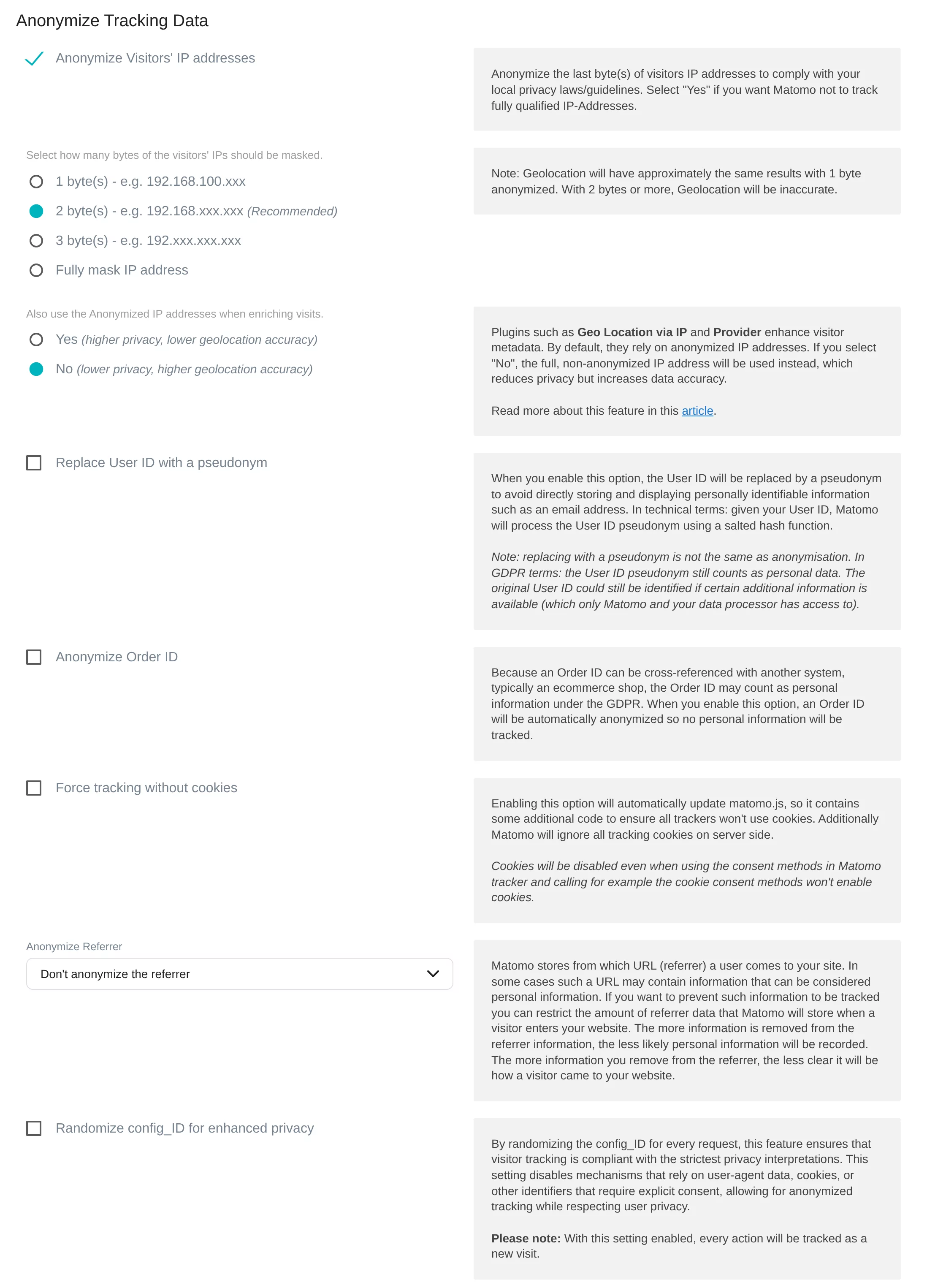
Two points deserve a second look. Enrichment with the full IP is active by default: if you want Matomo never to use the full IP, switch it and accept less precise locations. And the randomized config_ID sounds like more privacy, but turns every click into a visit of its own. Visits, bounce rate and visit duration lose their meaning.
Data already stored can be cleaned up afterwards: under Anonymize previously tracked raw data you mask IP addresses, anonymize locations or replace User IDs for a chosen period. This cannot be undone.
Personal data in URLs and titles
URLs are a common leak. Newsletter links with the email address, tokens from password links or search terms with names would otherwise end up in the reports. Under Websites > Settings (Global websites settings) you define which URL parameters Matomo discards: only Common session parameters, the list Matomo-recommended PII, or a custom list that adds to that recommendation. Also check page titles, event names and custom dimensions: whatever is in there, anyone allowed to open the reports can see.
Deletion and access requests
Deleting old raw data. By default Matomo keeps every single visit indefinitely. Under Regularly delete old raw data you set a period; Matomo suggests 180 days. The finished reports remain. What is no longer possible afterwards: new segments or newly created reports for periods whose raw data has been deleted.
Deleting old reports can be switched on as well. If the raw data is already gone by then, those reports are lost for good.
GDPR Tools. If a visitor asks for their data or wants it deleted, you find their visits under Privacy > GDPR Tools through a segment, for example the User ID or the visitor ID, and export or delete them there. Without cookies and without a User ID, however, a person’s visits can hardly be linked.
Opt-out and Do Not Track
Under Privacy > Users opt-out, Matomo comes with a ready-made opt-out that you embed in your privacy policy, either through the Matomo tracker or as self-contained code. The objection is stored in the cookie mtm_consent_removed, even if Matomo otherwise measures without cookies. Some browsers delete such cookies after a while, and the opt-out then no longer applies. Test the opt-out after every change.
I do not recommend Do Not Track, even though Matomo promotes it on its settings page. The standard is dead: the W3C stopped working on it in 2019, Safari removed it in 2019, Firefox in 2025. With support switched on, visits are missing from the reports, for a signal nobody else respects any more. If you want to honour a signal from the browser, use Global Privacy Control and check it in the tracking code.
A look at France: the CNIL check
Under Privacy > Compliance, Matomo has a check built in. It compares your settings with the conditions under which the French data protection authority CNIL allows audience measurement without consent, and can enforce them if you want.
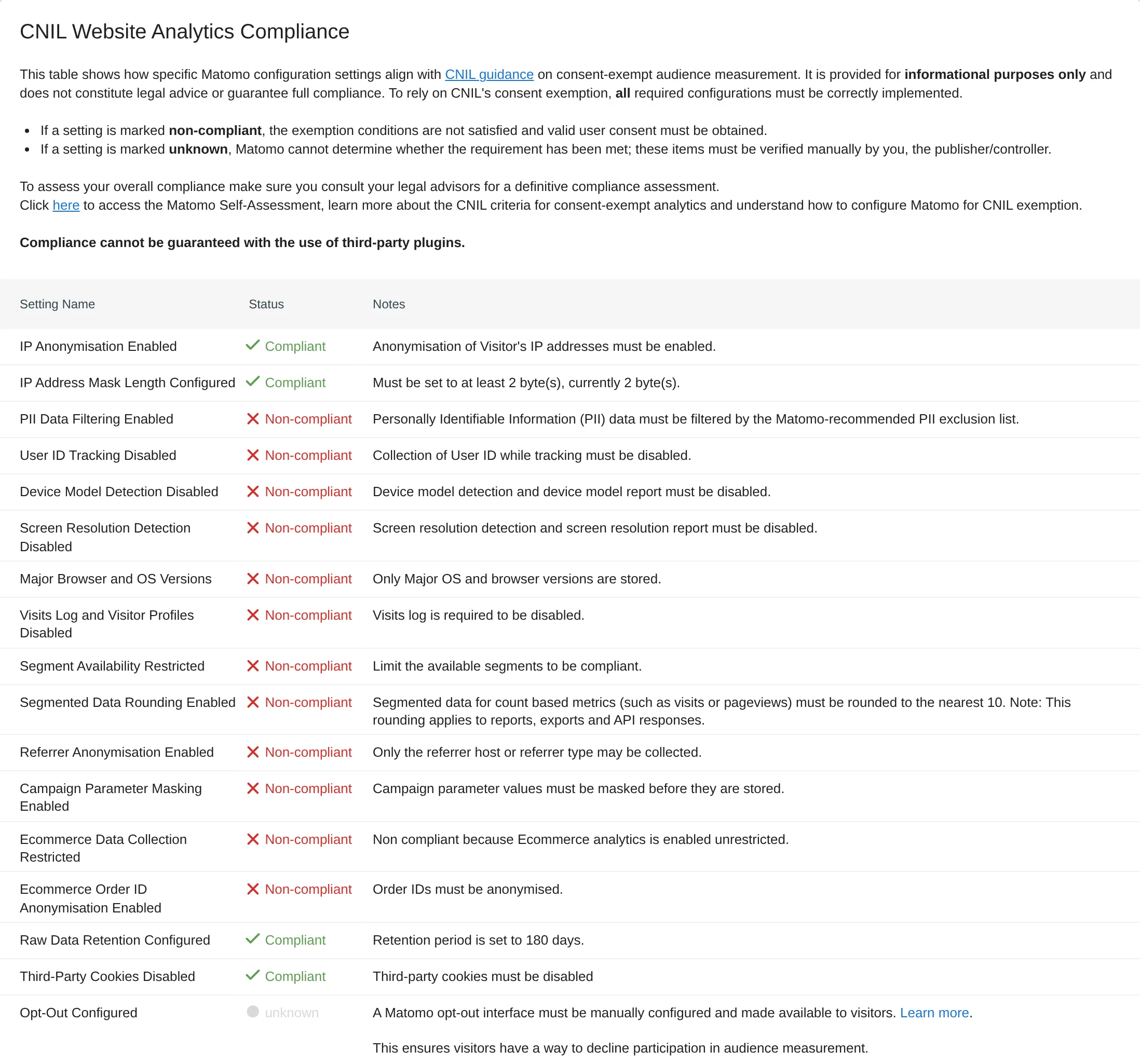
The list shows how strict these conditions are: no User ID, no device model, no screen resolution, only major versions of browsers and operating systems, no visits log, rounded numbers in segments, masked campaign values, raw data for at most 25 months. For Germany this is not the yardstick, because the TDDDG has no such exemption for web analytics so far. As a pointer to what “data-minimised” can mean, the list is useful all the same. Whether this changes with the EU’s Digital Omnibus is covered in the article Digital Omnibus: audience measurement without consent?.
Checklist
- Decide: with or without consent, and what you want to measure for it.
- Without consent:
requireCookieConsentordisableCookies, plusdisableBrowserFeatureDetection, and nothing in local storage, as described under Matomo without cookies. - Mask IP addresses and decide whether Matomo may use the full IP for the location.
- Exclude URL parameters, at least Matomo’s recommended list.
- Delete raw data after a period your data protection adviser sets.
- Offer an opt-out and test it.
- Switch off Do Not Track if it is active.
- Check in the browser: are really no cookies set before consent? Whether your website already sends data to third parties beforehand is shown by the free website check.
- Document what is configured. Your record of processing activities and your privacy policy rely on it.
Technology is not law
This page describes the technical side. Whether your setup is permissible without consent is for your data protection or legal adviser to answer. I take care of a clean implementation and documentation that makes this assessment possible, described under cookieless & privacy settings.
Sources
As of 11 November 2026
- § 25 TDDDG: protection of privacy in terminal equipment (German)
- German Data Protection Conference: guidance for providers of digital services (OH Digitale Dienste), version 1.2, November 2024 (German)
- Matomo: How do I use Matomo Analytics without consent or cookie banner?
- Matomo: Configure privacy settings in Matomo
- Matomo: Privacy (guide)
- Matomo: GDPR analytics
- CNIL: Cookies, solutions for audience measurement tools (French)