



Matomo 6 is less a firework of new reports than a modernisation: new minimum versions for PHP and the database, a new foundation for the interface, legacy cleaned up. On top come a few changes that directly affect your numbers. If you run Matomo yourself, plan the upgrade rather than clicking the button on the side.
Where Matomo 6 stands
The first beta of Matomo 6 came out in September 2026, seven more followed by the end of October. Since 30 October 2026 there is the first release candidate, 6.0.0-rc1. There is no final 6.0.0 yet, and Matomo has not announced a date. Matomo 5 continues to be maintained in parallel; 5.14.3-rc1 came out on 10 November 2026.
A release candidate is meant for testing, not for production. What you can already do: set up a copy of your instance and check there what this page says is coming.
What is new
| Change | What you get | What to watch |
|---|---|---|
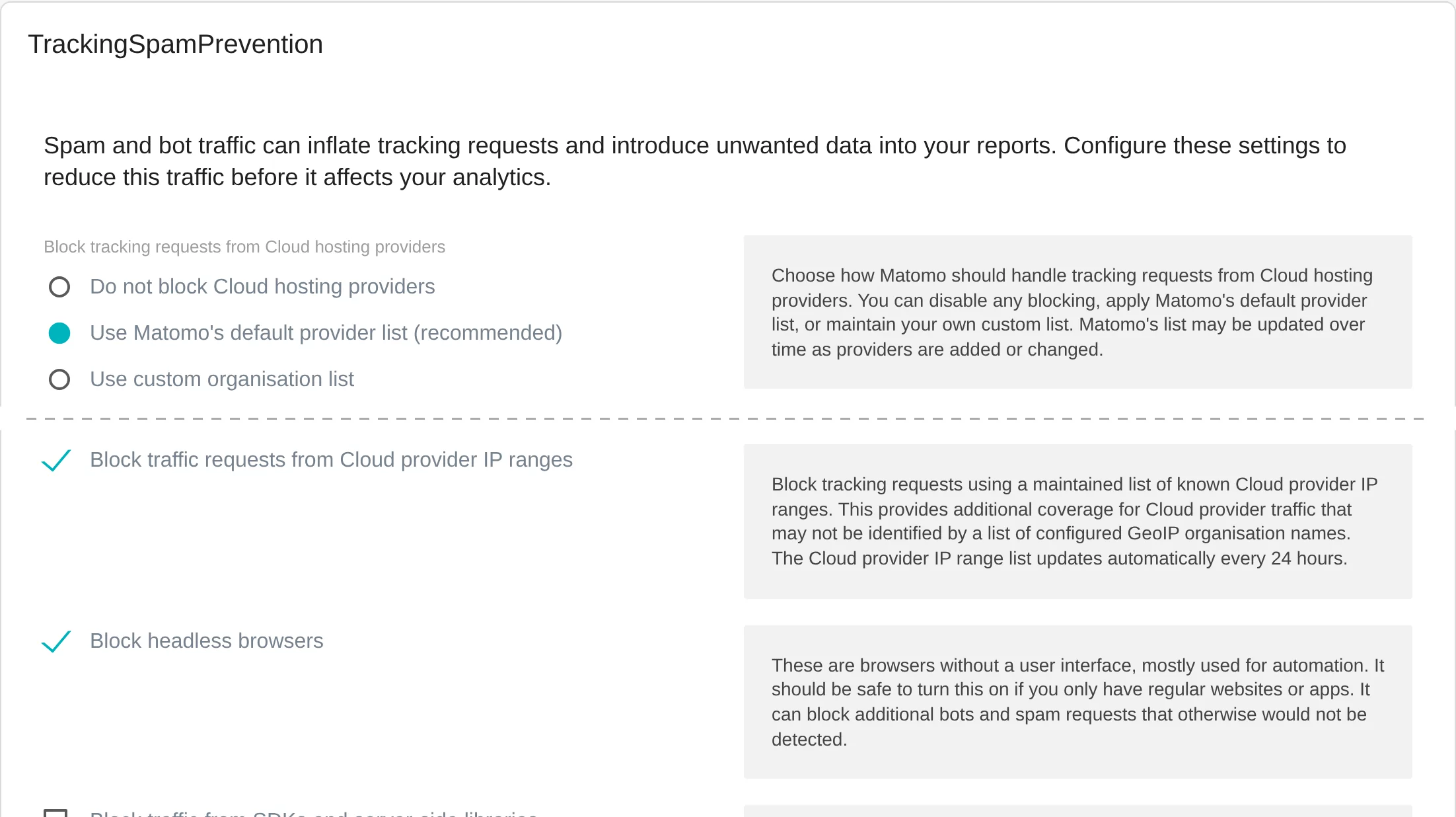
| Spam filter on by default | The Tracking Spam Prevention plugin, which already exists for Matomo 5, is now bundled and by default filters the data centres of large cloud providers and headless browsers | The upgrade switches the filter on, even if it was off before |
| More accurate time on page | A dedicated table measures how long each page view was visible | Applies to data after the upgrade, comparisons across the date are skewed |
| API tokens with their own permissions | A token for a dashboard or an integration can be read-only | Existing tokens keep their user’s permissions |
| Share of total in reports | Columns such as Visits (%) in the API, exports and scheduled reports | Scripts that read exports by column position break |
| Redrawn maps | Current geographic data, regions and country labels in the right place | Nothing |
| Consistent controls | The same dropdowns, search fields and report headers everywhere | Some familiar buttons have moved |
| Faster page reports | Page URLs and page titles are archived flat, good for large websites | New installations only, existing ones keep their behaviour |
In Tag Manager you will see who created a version and who published it, and before you delete a trigger or a variable, Matomo lists every place that still uses it.
And what is not new: AI Insights and the AI agents already exist in Matomo 5. If you expect AI from Matomo 6, you will be disappointed; if you want to use AI, you do not need the upgrade for it.
What changes in your numbers
You will notice three changes in your reports:
- Fewer visits. The upgrade switches on the Tracking Spam Prevention spam filter, even where it was deactivated. Requests from the data centres of large cloud providers and from headless browsers then drop out. How many depends on your website.
- Different time on page. For data after the upgrade, Matomo measures time on page more accurately. Older periods are calculated as before. Read comparisons across the upgrade date with care.
- More columns in exports. API responses and exports contain new
…_percent_of_totalcolumns. If you process data automatically, check your scripts. With the parameterpercent_of_total=0a request keeps the old structure.
Add an annotation in Matomo on the day of the upgrade. Then even a year later everyone knows why visits dropped on that day, and comparing the weeks before and after shows roughly how much automated traffic used to be counted.
A basic filter, not spam protection
The filter is not a new tool. It is the Tracking Spam Prevention plugin that already exists for Matomo 5; Matomo 6 merely bundles it and switches it on by default. With the default settings it mainly blocks two things: requests from the networks of large cloud providers and headless browsers that identify themselves as such. Bots that come with a real browser from other networks or behave like visitors are not detected.
If you want to fight spam seriously, you need more. That is what our sister brand Feinwerk built the plugin Feinwerk Tracking Spam Score for: it detects bots by how whole groups of visits behave, even if each single visit looks normal, shows the sources per network with the reasons and blocks them on the server side while tracking. It runs in your Matomo, without additional JavaScript and without an external service.
Is the upgrade worth it?
In favour
- Basic filter by defaultRequests from cloud data centres and headless browsers drop out without further settings.
- Safer integrationsDashboards and tools get a token that can only read.
- More accurate time on pageTime on page is based on real measurements per page view.
- Current foundationPHP and the database have to be modern anyway; Matomo 6 requires it.
Better wait if
- An important plugin is missingWithout a version for Matomo 6 it is deactivated during the upgrade.
- Integrations are untestedThe API checks parameters more strictly and answers errors with 400.
- The database is very largeThe change to log_visit needs a planned maintenance window.
- There is only a release candidateFor production, the final version is the right moment.
Checking the requirements
PHP 8.1 or newer. Also check php.ini: the function glob() must not be listed under disable_functions, otherwise Matomo 6 does not start.
MySQL 8.0 or MariaDB 10.6. That is the minimum, but not a good target: the system check of Matomo 6 reports MySQL 8.0 as no longer supported since 1 May 2026 and MariaDB 10.6 community edition since 7 July 2026. If you have to touch the database anyway, go straight to a current version, as a separate step before the Matomo upgrade.
Plugins. Every plugin has to declare explicitly that it runs on Matomo 6. If there is no version for Matomo 6, Matomo deactivates it during the upgrade. Go through the list of active plugins before you upgrade and decide for missing ones whether to wait or do without. Custom plugins need adjusting, because a lot has changed under the hood.
Operations. Three things are dropped or get stricter:
- The old archiving script
misc/cron/archive.shis gone. The cron job calls./console core:archive. - One Click Update only downloads over HTTPS.
- If Matomo runs behind a proxy with
proxy_host_headers, add the public hostname and the internal one totrusted_hostsbefore the upgrade, otherwise a warning replaces the login.
And the SEO plugin with the “SEO Rankings” widget is removed. Check dashboards that still show it.
The upgrade step by step
- Set up a copy and run the upgrade there first. Measure how long the database change takes.
- Bring PHP and the database to the new versions, as a separate step with its own test.
- Check plugins, with a Matomo 6 version ready for every active plugin.
- Plan the maintenance window based on the measured duration, not on gut feeling. According to Matomo, the new column in
log_visitand the new table for time on page are the slowest part on large installations. - Back up database and configuration.
- Run the upgrade, on large installations from the console with
./console core:updateinstead of the browser. - Check archiving: is the cron job running with
core:archive, and does the system check under Diagnostics report no errors? - Add an annotation on the day of the upgrade.
- Check numbers and integrations: visits, goals, exports, dashboards, everything that queries the API.
Our sister brand Feinwerk describes this in more detail for operators, with commands and pitfalls, in the Matomo 6 upgrade checklist and the news on Matomo 6 beta 6.
Staying on Matomo 5 as long as needed
Matomo keeps supporting a major version for at least twelve months after the next one is released, with security updates and critical bug fixes. So that your instance does not jump to Matomo 6 by accident, choose the long-term support channel under Administration > System > General settings > Update settings: in the release channel options, “Latest stable 5.X (Long Term Support version)”.
Use that time for testing, not for postponing. Twelve months pass quickly when plugins, integrations and the database have to be adjusted one after the other.
Sources
As of 11 November 2026, Matomo 6.0.0-rc1