



On 23 November 2026 Matomo 6.0.0 came out, the first major release since December 2023. It brings fewer new reports than a modernised foundation: PHP 8.1, MySQL 8, a new base for the interface and legacy parts cleaned up. On top come changes that affect your numbers directly, and a few pitfalls for everyone who runs Matomo themselves. My recommendation up front: test on a copy now, and upgrade production with the first bugfix release, 6.0.1.
The key points
- The spam filter is built in. The upgrade switches it on. If visits drop afterwards, Matomo filters more precisely; fewer people are not coming.
- Tokens get their own permissions. Dashboards and integrations can connect with a token that may only read.
- Time on page becomes more accurate. Read comparisons across the upgrade date with care.
- The API and exports have new columns. Scripts that process exports need checking before the upgrade.
- Plugins without a version for Matomo 6 are deactivated during the upgrade. Check every active plugin beforehand.
- Matomo 5 remains a safe bridge. It gets security updates and bugfixes until at least 23 November 2027.
What is new in daily work
API tokens with their own permissions. Until now a token could do everything its user can. From Matomo 6 you choose the highest permission a token may use when you create it, for example view only. A Power BI dashboard, a CRM sync or an AI tool thus gets exactly the rights it needs, not those of an admin. Existing tokens are set to “Inherit user access” and keep the rights of their user. How to use tokens safely is covered in API, MCP and OAuth.

Percentages in email reports. Scheduled reports now show the share of the total for each number, such as Visits (%) and Actions (%), in HTML, PDF, CSV and TSV. If you want to put a channel or a page into context, you no longer have to calculate it yourself. More on good reports in Email reports.
A more consistent interface. Dropdowns, select fields and menus look and behave the same everywhere, reports share one header design and link to more details where an online guide exists. The visitor and real-time maps are redrawn with current geographic data, so regions and country labels now sit in the right place.
In Tag Manager you see who created a version and who published it to which environment. Before you delete a trigger or a variable, Matomo lists every place that still uses it, with a link there. More on Tag Manager in Matomo Tag Manager.
For operators there is the console command core:rotate-encryption-keys with a dry run, and new installations archive page URLs and page titles flat, which makes large websites faster. Existing installations keep their previous behaviour.
What changes in your numbers
Fewer visits, depending on where you start. The Tracking Spam Prevention plugin, which was an add-on for Matomo 5, is bundled with Matomo 6 and can no longer be uninstalled. The upgrade activates it, even if it was off before. By default it blocks headless browsers, including those driven by AI tools. Blocking requests from the networks of large cloud providers is on by default for new installations, while an upgrade keeps its previous setting. If you have not used it so far, switch it on yourself under Administration > System > General settings; Matomo recommends its own default list there. How many visits drop out depends on your website.
A different time on page. Matomo now measures the time on page per page view in a table of its own. That applies to data from the upgrade on; older periods are calculated as before.
New columns in the API and exports. Every metric gets a column …_percent_of_total, in API responses and in every export format. Scripts that read columns by their position break. With the parameter percent_of_total=0, a request keeps the old layout.
Add an annotation in Matomo on the day of the upgrade and tell everyone who works with the numbers. Then nobody asks in three months why visits fell on that day.
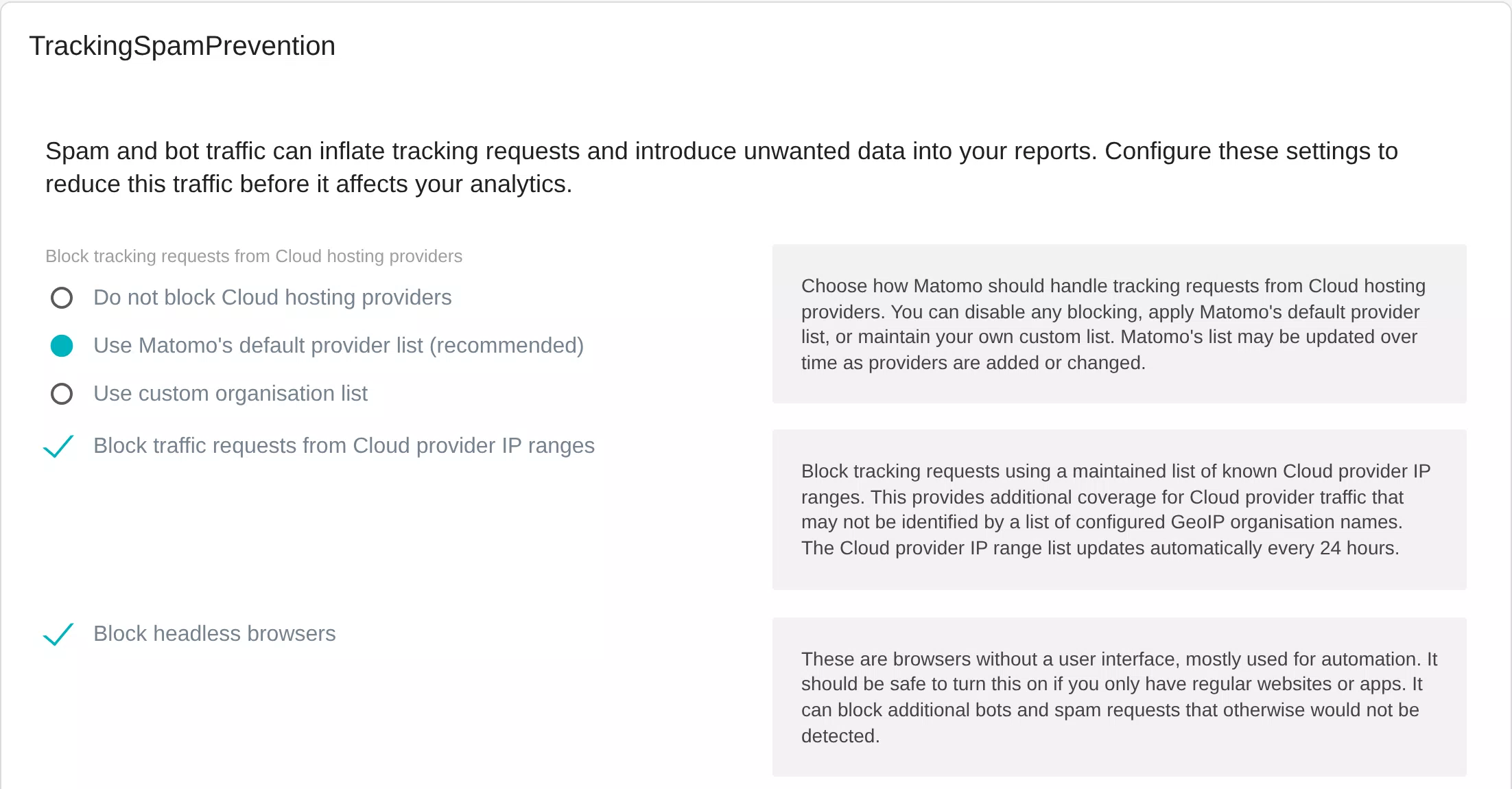
A basic filter, not spam protection
The built-in filter catches what gives itself away: requests from known data centres and browsers that identify themselves as headless. Bots that come with a real browser from other networks or behave like visitors go unnoticed. If you deal with targeted spam or click fraud, you need detection based on behaviour.
Pitfalls of the upgrade
On Matomo Cloud, Matomo takes care of the upgrade. If you run Matomo yourself, tick off these points first:
| Pitfall | How you notice | What to do |
|---|---|---|
| PHP 8.0 or older | Matomo 6 requires PHP 8.1 | PHP 8.1 or newer, as a separate step before the upgrade |
| MySQL below 8.0 or MariaDB below 10.6 | Matomo 6 requires the newer database | Upgrade the database first, ideally straight to a current version: the system check already reports MySQL 8.0 and MariaDB 10.6 Community as no longer supported |
glob() in disable_functions |
Matomo 6 does not start | Allow the function in php.ini |
| Large visits table | The upgrade takes very long | New column in log_visit and a new table for time on page: measure on a copy, plan the maintenance window accordingly, upgrade via the console with ./console core:update |
| Plugins without a version for Matomo 6 | Matomo deactivates them automatically during the upgrade | Check every active plugin first; where one is missing, wait or do without |
Proxy with proxy_host_headers |
A warning instead of the login | Add the public and the internal hostname to trusted_hosts beforehand |
Cron job with archive.sh |
Archiving no longer runs | Switch to ./console core:archive |
| One Click Update | Now downloads over HTTPS only | Allow outgoing HTTPS on the server or upgrade via the console |
| SEO plugin | Removed, along with the API method SEO.getRank |
Adjust queries that still use it |
| Spam filter after the upgrade | Cloud provider blocking stays off if it was off before | Check the setting and switch on the default list |
| Imports with their own timestamp | The tracking API answers with 400 | Check timestamps: parseable, no more than a day in the future, no older than 20 years |
| Your own plugins | Errors after the upgrade | Replace removed APIs, move the Vue build to Vite, test beforehand |
The procedure step by step, with the release channel for the long-term support version and a route map for the maintenance window, is in the guide Matomo 6: what is new and how to upgrade. A checklist with commands for self-hosters is published by our sister brand Feinwerk at Matomo 6 upgrade checklist: what self-hosters need to check first.
Feinwerk plugins for Matomo 6
Our sister brand Feinwerk develops plugins for Matomo. As of 23 November 2026, all 17 plugins in the Feinwerk store have a version for Matomo 6:
| Plugin | Matomo 6 | Matomo 5 |
|---|---|---|
| Auth SAML | yes | yes |
| Campaign Score | yes | yes |
| Channel Grouping | yes | yes |
| Conversions API | yes | yes |
| Dashboard Segment | yes | yes |
| Dashboard Sharing | yes | yes |
| Data Exploration | yes | yes |
| Delete Visits Filter | yes | yes |
| Email Reports Pro | yes | yes |
| Live Dashboard | yes | yes |
| Page Filter Report | yes | yes |
| Search Report | yes | yes |
| Sentinel | yes | yes |
| Sentinel Pro | yes | yes |
| Tracking Router | yes | yes |
| Tracking Spam Score | yes | yes |
| Visit Journey | yes | yes |
According to the store, Feinwerk maintains the versions for Matomo 5 until 23 November 2028. You find the current status per plugin in the Feinwerk store.
When to upgrade?
Matomo keeps supporting a major version for at least twelve months after the next one is released. Matomo 5 therefore gets security updates and bugfixes until at least 23 November 2027. So that your instance does not jump by accident, set the release channel to the long-term support version 5.X under Administration > System > General settings > Update settings.
If you plan the upgrade yourself and would like a second opinion, I check your instance beforehand or accompany the upgrade: Setup & infrastructure and Matomo audit.
Sources
As of 23 November 2026
Questions about your setup?
In an intro call we'll look at your situation together.
Book an intro call